Tuesday, 24 May 2016

SQL Injection

I] What is sql injection?
1) SQL Injection is a technique used to attack database from web applications.
2) Here unvalidated users input, (which is vulnerable) along with sql queries from web applications are sent to database for execution.

II] Example/How to do SQL Injection:
In URL : http://www.employee.com/details/employe.aspx?Empid=47 (where users details are displayed , attacker can change the query string and re-execute the url )
like: http://www.employee.com/details/employe.aspx?Empid=47; drop table employee

These kinds of sending, inserting SQL malicious commands from input box/url is called as sql injection.

III] How to avoid/prevent SQL Injection?
1) Always use stored procedures instead of query.
2) Validate parameters and pass to server.
3) Check and replace special symbols which harms database.
4) Configure error reporting.


Bind Variable

https://www.youtube.com/watch?v=TJtjo3FTBtE
watch above link for more info on bind variables.


Friday, 25 March 2016

Burp suite

What is Burp suite?

  1. Burp suite is a java application with .jar extension designed for security testing of web   applications.
  2. Burp suite acts as a http proxy server, where all http request, response (all http traffic) are passed through proxy server from your browser.
  3. Before using Burp suite make sure java with version 1.6 or latter is installed, to check that type java -version in command prompt.
  4. If you want to change display setting like font size etc then navigate to options tab --> Display submenu --> edit in user interface.
  5.  
  6. You can refer link for more info:

    https://portswigger.net/burp/help/proxy_options.html#listeners.
  7. Before using Burp suite, turn off the intercept first which is available in Proxy tab --> Intercept sub tab, refer below.
  1.  


8. Navigate to Proxy tab --> Option sub tab and make sure Interface is Running.
9.


    • 2nd step is to change proxy server setting, enter http proxy as local host and port as 8080 in Manual proxy configuration in browser.
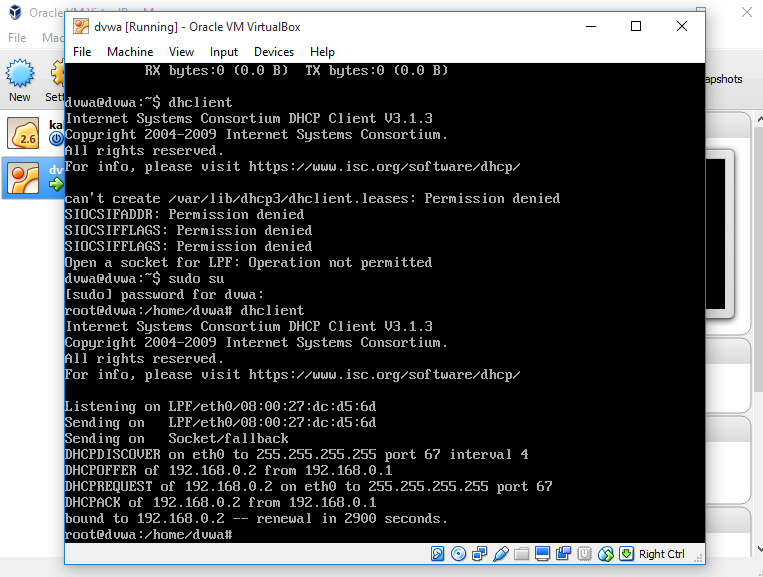
    • Download DVWA Damm vulnerable web application. open oracle VM virtual box --> clink on new --> enter name as dvwa and type as Linux in create virtual machine
    • follow steps mentioned in screenshot:


  • type ifconfig, and whatever ip you will get put it in browser so that DVWA will be accessible to you using browser.


Tuesday, 22 March 2016

OWASP : Sensitive Data Exposure.

Sensitive Data Exposure:

  1. Here the sensitive data e.g credit card number, password,sensitive files, sessions, cookies etc are not saved in encrypted format hence this data is clearly visible to attacker.
  2. This clear text data can be captured using burpsuite.
  3. So the sensitive data if not encrypted by using strong encryption technique can lead to sensitive data exposure.

OWASP : Insecure Direct Object Reference

Insecure Direct Object Reference:

  1. Insecure direct object references occurs when the applications provides direct access to objects based on user supplied input.
  2. This means when objects are not used securely by developer then the attacker can try to change the values in URL and doing this the user will be able to view/edit information of other users which ideally he should not be able to view/edit information.
  3.  eg: suppose there are two types of users i) normal user ii) admin user then when normal user opens site and changes the value of value in URL then he will be able to view information of admin and can able to edit information of his as well.
  4. e.g: This is website link www.abc/a.php?id=1111 by opening this link we will get information of normal user when user is able to edit his details.
  5. But when attacker changes the value of id as 1288 as mentioned below www.abc/a.php?id=1288 then he will be able to view admins page when he can update admins information.
  6. So this occurs when objects are not handled by developer, and attacker will be able to view/edit database records, files information etc. 

Monday, 21 March 2016

OWASP : Cross Site Request Forgery

Cross Site Request Forgery:
  1. Here attacker studies the website functionality.
  2. After studying the functionality attacker can create similar page with same functionality but changes the values of attributes/parameters. 
  3. Here victim user should be already logged into intended website, that is they should already have active session.
  4. Victim should already be logged into the web application then only this vulnerability will work.
Identifying CSRF Vulnerability:
  1. Study the web application functionalities.
  2. Below are some of the functionalities where CSRF may be possible:
  • Change passwords
  • Transfer money
  • Add users
  • Delete users
  • Change roles
  • Post data on behalf of users
How to avoid CSRF:
Use CSRF Token


  1. In DVWA (Damn Vulnerable Web Application) Attacker can go through change password functionality.
  2. We can see that when we try to change password, password can be visible in clear text in URL
  3. http://192.168.0.7/vulnerabilities/csrf/?password_new=abcd&password_conf=abcd&Change=Change#
  4. Now we can change the password value in URL i.e craft the URL and send it to victim user who is already logged into same application.
  5. As mentioned below we changed the password value to new value.
  6. http://192.168.0.7/vulnerabilities/csrf/?password_new=dddd&password_conf=dddd&Change=Change#
  7. Here we have created new HTML page in linux ubuntu
  8. Type notepad in command prompt.
  9. Enter below html text in notepad, i.e. change password value in it and enter forged URL in anchor tag of HTML Save it as html page
  10. <html>
    <body>

    <a href="192.168.0.7/vulnerabilities/csrf/?password_new=dddd&password_conf=dddd&Change=Change#"> Click Here </a>

    </body>
    <html>
  11. Save this forged html page in attacker's domain /var/www
  12. /var/www - here web pages are hosted in linux so that anyone will be able to open web pages in their browser by typing the address.
  13. Provide this link to victim user, who is already logged into DVWA.
  14. Once user clicks on that link his password will be changed , that is without knowledge of victim.


Saturday, 19 March 2016

OWASP : Unvalidated Redirect and Forward:

  •  Please Note: This is only for educational purpose. 
What is OWASP?
Open Web Application Security Program is an online community, wherein security professionals have created online free article for vulnerability/ security risks/flaws in web applications.
  •  Unvalidated Redirect and Forward:
  1. Here attacker changes the attribute value in URL where the link is redirected to another webpage.
  2. e.g. the value of redirect attribute, where redirect is the name of attribute used in URL.
  3. This happens as proper validation is not done for the attributes in URL. like domain validation.
  4. The aim of attacker is to force the user to visit attackers website, which is already malicious. 
  5. When attacker notices such type of vulnerability in we application , the attacker change put his malicious website link inside the redirect attribute and can send it to victim.
  6. when victim clicks on such link he is redirected to malicious attackers website, so such website can be created similar as of original website and can force victim (which is unknown to victim) to visit, download malicious code.
How to find such website:
  1. Find the websites which has this issue using google dork , e.g.  inurl:redirect_2.php, This google dork will give you website links where redirect word is present in URL.
  2. e.g xyz/redirect_2.php?url=www.xyz.com
  3. e.g xyz/redirect2.php?url=www.xyz.com
  4. Here if you change the value of redirect attribute , in this case url is the name of attribute and you are changing attribute value and if it works then this website is prone to unvalidated redirect and forward vulnerability. 
  5. That means this website is not properly validated in terms of URL.
  6. When such changed URL is visited by user then attacker can take advantage of this, i.e it can be redirected to attackers malicious website.
  7. like attacker can create similar page like original page, input box, password, such things can be saved in background.

Get and Post methods in HTML URL:
  1. Get method :   
  • Using this method the values are clearly visible in URL. 
  • So this method should not be used for sensitive usage. 
  • Get method is not secured.


  • In above example I entered password in both text field and clicked on change button.
  • You can observe my password in clear text inside URL :
  • http://192.168.0.7/vulnerabilities/csrf/?password_new=abcd&password_conf=abcd&Change=Change# 
  • This is possible as I have used GET Method in Form tag.

 2. Post method:
  • Using this method the values are not visible in URL
  • So this method should be used in HTML